
autoplot() turns a fitted lm() into a complete ggplot in one call: the
data the model was fitted to as a scatter, with a geom_slice() prediction
line — and, by default, its confidence ribbon — through it. The result is a
regular ggplot, so it can be extended with + as usual (labels, scales,
more layers).
Arguments
- object
A linear model fitted by
lm()with adataargument — the data is recovered from the model, solm(y ~ x, data = your_data)works butlm(your_data$y ~ your_data$x)does not.- mapping
Aesthetics created with
ggplot2::aes(), passed toggplot2::ggplot()— for examplemapping = aes(color = factor(cyl)). They resolve against the model's full data frame, so a column the model never mentions (such ascylabove) still works. An entry namedxchooses the x-axis (mapping = aes(x = hp)), overriding the default first numeric predictor; an entry namedyoverrides the response axis.- type
"2d"(default) for ageom_slice()ggplot, or"3d"for an interactivescatter_3d()surface (needs exactly two numeric predictors).- summary
Whether to print
summary(object)to the console before returning the plot (defaultTRUE). Printing it up front means you can refit the model and inspect its coefficients from inside the sameautoplot()call; passsummary = FALSEto suppress it.- interval
The ribbon drawn around the slice line, passed to
geom_slice():"confidence"(default) for the mean's confidence interval,"prediction"for a single new observation's interval, or"none"for a bare line. Ignored whentype = "3d".- ...
Passed on to
geom_slice()— for examplepredict_vars = list(hp = 110)to choose the slice, or fixed aesthetics such ascolor = "red"— or toscatter_3d()whentype = "3d".
Value
A ggplot of the model's data with a slice of the model drawn
through it, or — when type = "3d" — a plotly surface from scatter_3d().
Details
Pass type = "3d" for a model with exactly two numeric predictors to get an
interactive scatter_3d() surface instead of the 2-D slice; ... is then
forwarded to scatter_3d() (e.g. n, colors).
The model's first numeric predictor goes on the x-axis (override with
mapping = aes(x = ...)) and the raw response variable goes on the y-axis.
A predictor that groups into a few discrete lines rather than varying
continuously — non-numeric, or numeric with at most five distinct values
(like cyl's 4/6/8) — is worth showing, not holding at one value: the first
such predictor not already on the plot becomes aes(color = ...) (one slice
line per level) and a second one facets the plot. Everything past that
is handled by geom_slice() and reported on the console: predictors not
visible on the plot are imputed (mean for numeric, most common value for
factor/character), and a transformed response such as lm(log(y) ~ x) is
automatically back-transformed to match the raw y-axis.
See also
geom_slice(), which draws the line and handles everything
slice-shaped; scatter_3d() for the interactive surface; and
geom_slice_subtitle() / geom_slice_text() to annotate the result.
Examples
library(ggplot2)
# A complete plot from a model in one call; summary() prints to the console
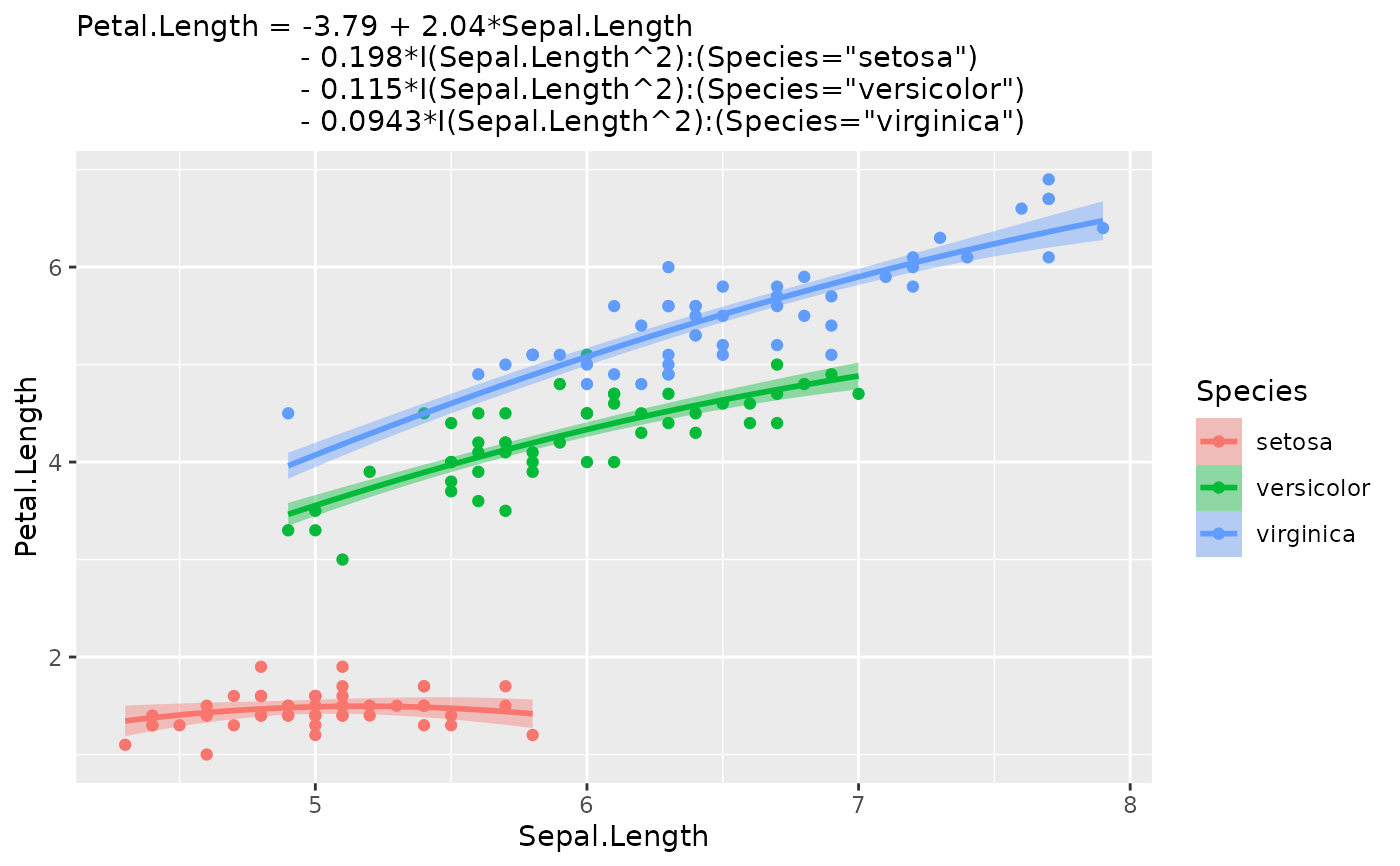
autoplot(lm(Petal.Length ~ Sepal.Length + I(Sepal.Length^2):Species, iris))
#>
#> Call:
#> lm(formula = Petal.Length ~ Sepal.Length + I(Sepal.Length^2):Species,
#> data = iris)
#>
#> Residuals:
#> Min 1Q Median 3Q Max
#> -0.72665 -0.15039 0.00562 0.16639 0.76639
#>
#> Coefficients:
#> Estimate Std. Error t value Pr(>|t|)
#> (Intercept) -3.79412 1.09932 -3.451 0.000731 ***
#> Sepal.Length 2.04477 0.36389 5.619 9.51e-08 ***
#> I(Sepal.Length^2):Speciessetosa -0.19763 0.02958 -6.680 4.75e-10 ***
#> I(Sepal.Length^2):Speciesversicolor -0.11503 0.03033 -3.793 0.000218 ***
#> I(Sepal.Length^2):Speciesvirginica -0.09427 0.02987 -3.156 0.001944 **
#> ---
#> Signif. codes: 0 ‘***’ 0.001 ‘**’ 0.01 ‘*’ 0.05 ‘.’ 0.1 ‘ ’ 1
#>
#> Residual standard error: 0.262 on 145 degrees of freedom
#> Multiple R-squared: 0.9786, Adjusted R-squared: 0.978
#> F-statistic: 1655 on 4 and 145 DF, p-value: < 2.2e-16
#>
#> Coloured the plot by `Species` - one slice line per level.
#> To choose the colour, use 'mapping = aes(color = ...)'.
 # Predictors that group into a few values become color, then facets
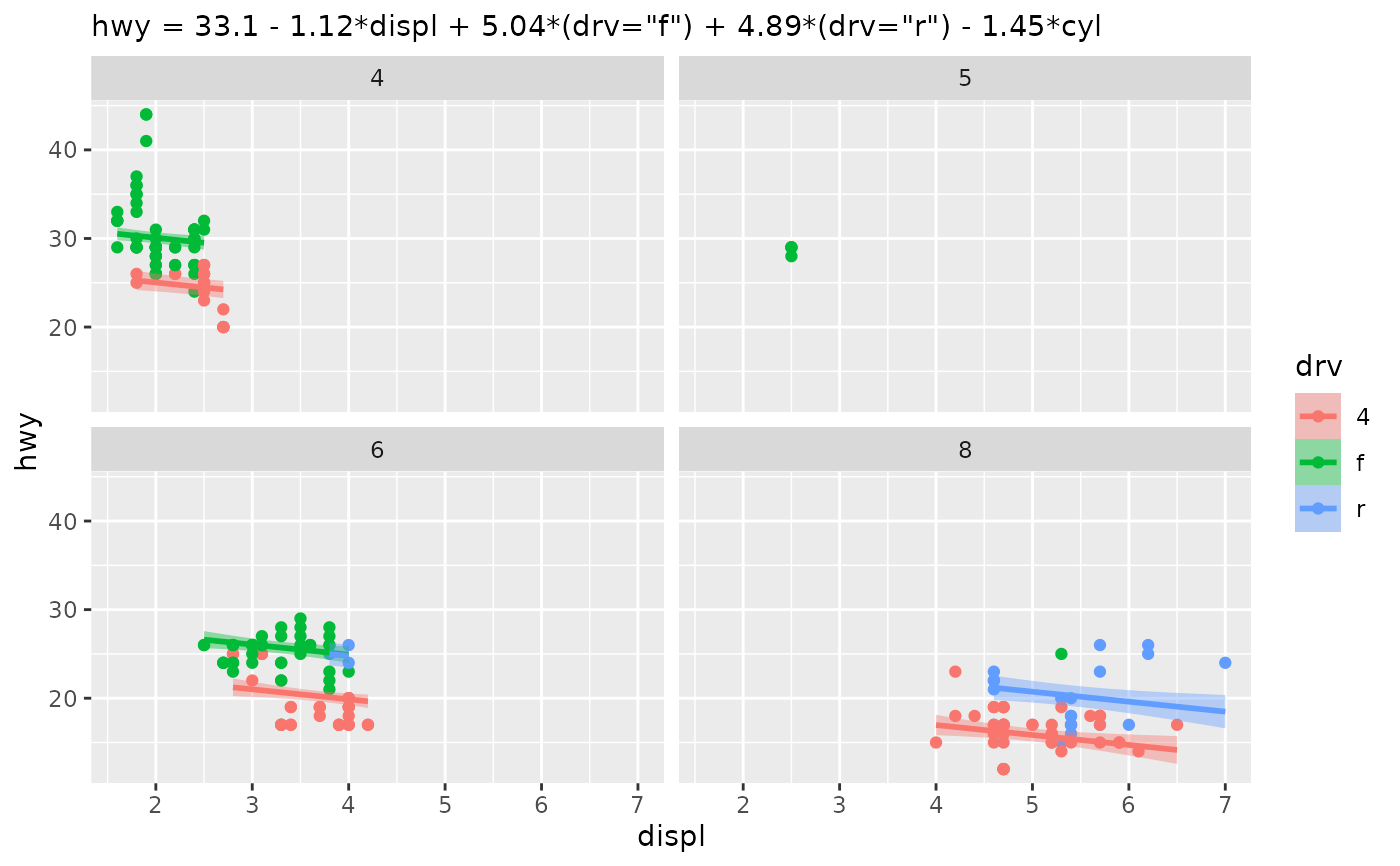
model <- lm(hwy ~ displ + drv + cyl, data = mpg)
autoplot(model, summary = FALSE)
#> Coloured the plot by `drv` - one slice line per level.
#> To choose the colour, use 'mapping = aes(color = ...)'.
#> Faceted the plot by `cyl` - one panel per level.
#> For a single panel, drop `cyl` from the model.
# Predictors that group into a few values become color, then facets
model <- lm(hwy ~ displ + drv + cyl, data = mpg)
autoplot(model, summary = FALSE)
#> Coloured the plot by `drv` - one slice line per level.
#> To choose the colour, use 'mapping = aes(color = ...)'.
#> Faceted the plot by `cyl` - one panel per level.
#> For a single panel, drop `cyl` from the model.
 # Change the defaults like a normal ggplot; the rest is still inferred
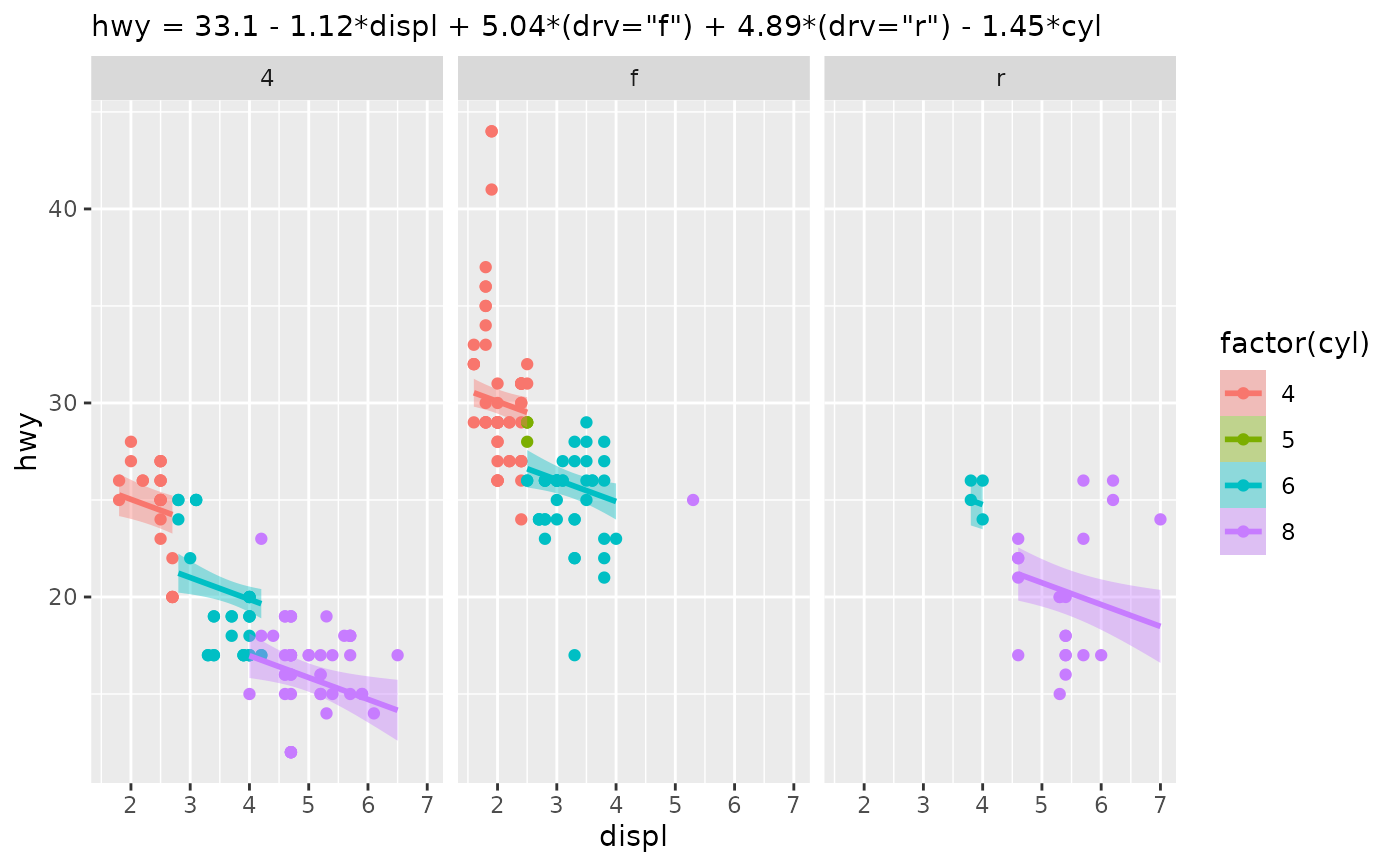
autoplot(model, aes(color = factor(cyl)), summary = FALSE) + facet_wrap(~drv)
#> Faceted the plot by `drv` - one panel per level.
#> For a single panel, drop `drv` from the model.
# Change the defaults like a normal ggplot; the rest is still inferred
autoplot(model, aes(color = factor(cyl)), summary = FALSE) + facet_wrap(~drv)
#> Faceted the plot by `drv` - one panel per level.
#> For a single panel, drop `drv` from the model.
 # Choose the x-axis and pass geom_slice() options through
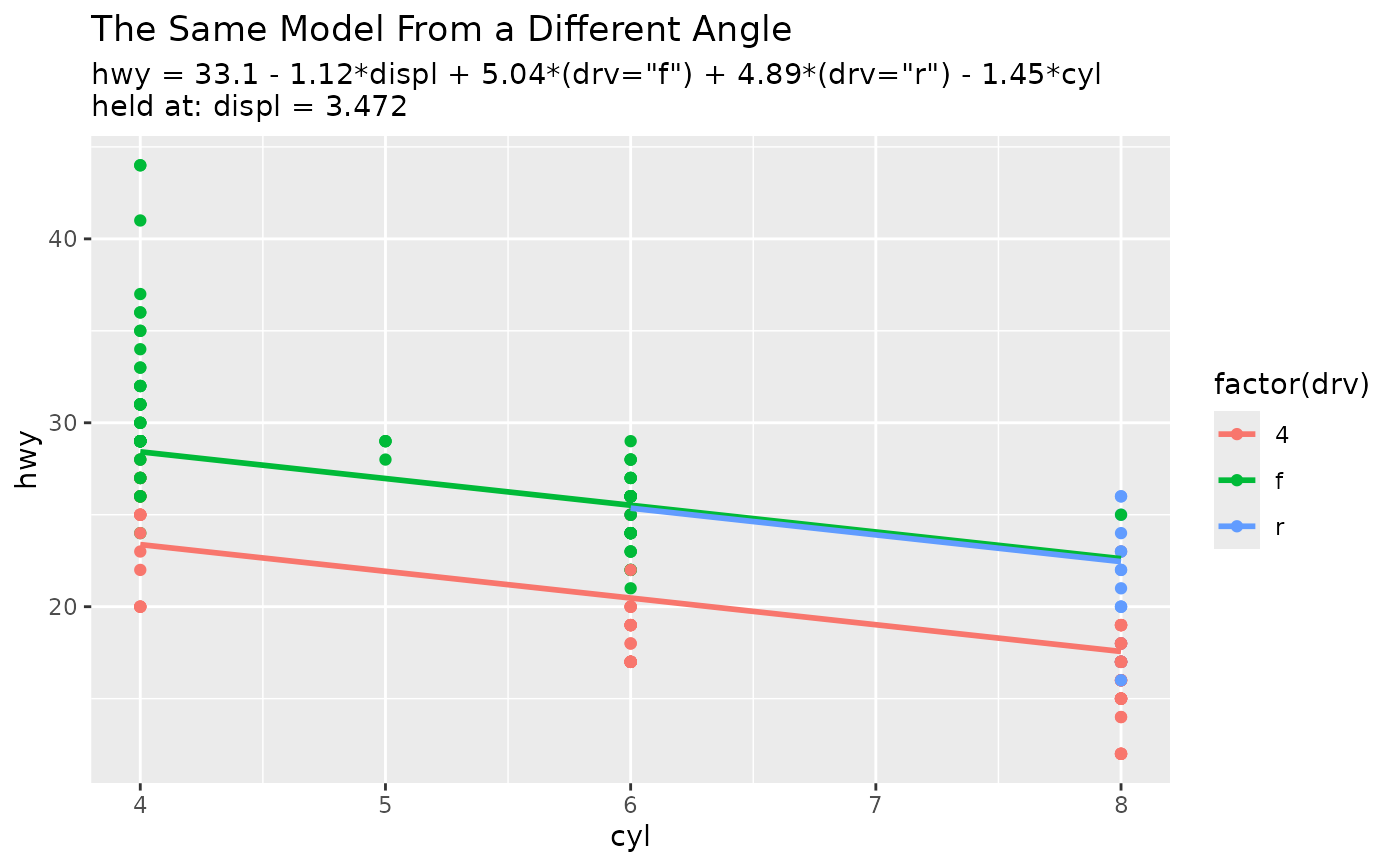
autoplot(model,
aes(x = cyl, color = factor(drv)),
interval = "none", summary = FALSE) +
labs(title = "The Same Model From a Different Angle")
#> Value for `displ` not specified - Used mean: 3.472
#> To choose a slice, use 'predict_vars = list(displ = 3.472)'.
# Choose the x-axis and pass geom_slice() options through
autoplot(model,
aes(x = cyl, color = factor(drv)),
interval = "none", summary = FALSE) +
labs(title = "The Same Model From a Different Angle")
#> Value for `displ` not specified - Used mean: 3.472
#> To choose a slice, use 'predict_vars = list(displ = 3.472)'.
 # Transformed response, back-transformed onto the raw mpg axis
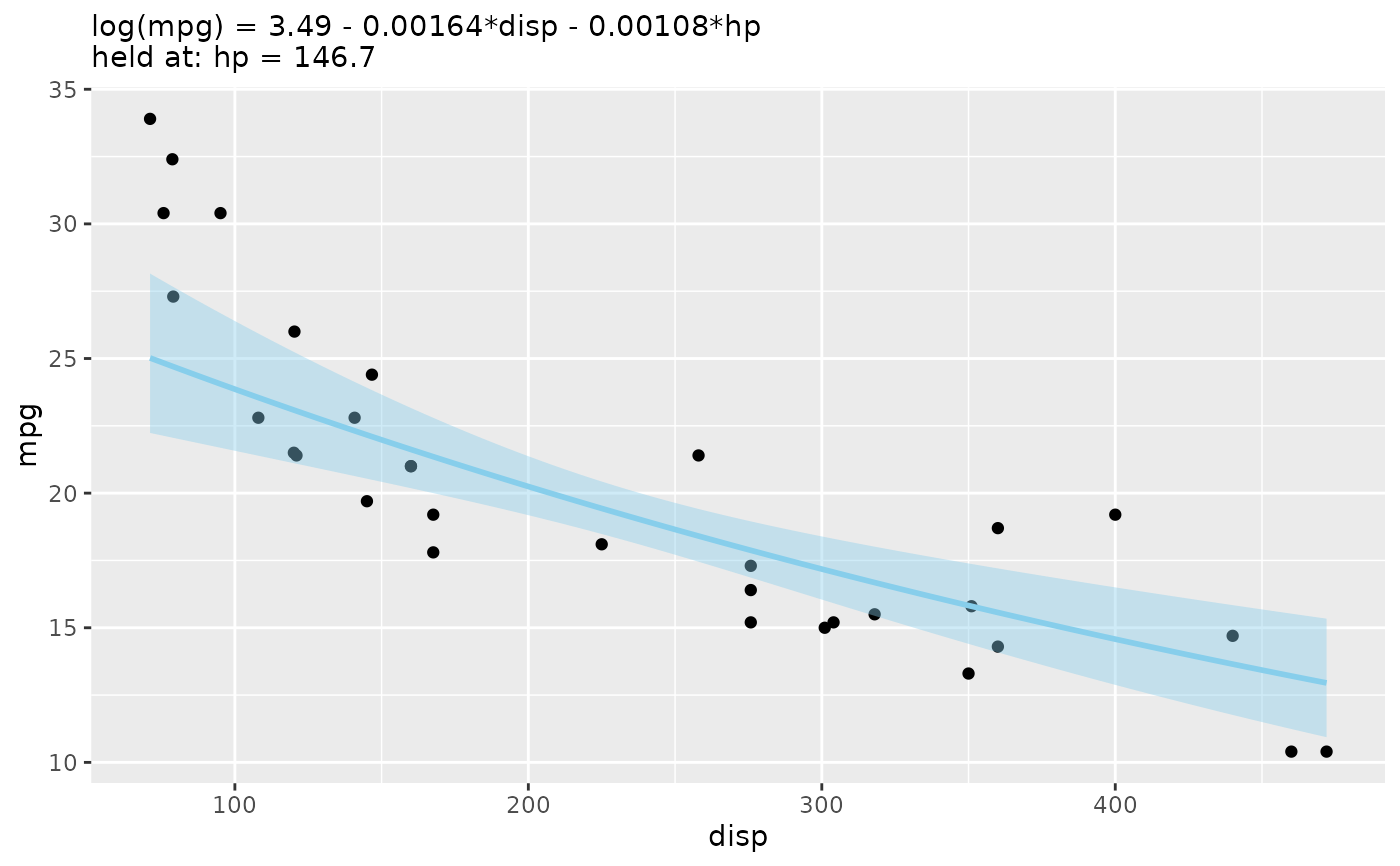
autoplot(lm(log(mpg) ~ disp + hp, data = mtcars), summary = FALSE)
#> Value for `hp` not specified - Used mean: 146.7
#> To choose a slice, use 'predict_vars = list(hp = 146.7)'.
#> Predictions of `log(mpg)` were back-transformed to match the `mpg` axis.
#> To turn this off, use 'back_transform = FALSE'.
# Transformed response, back-transformed onto the raw mpg axis
autoplot(lm(log(mpg) ~ disp + hp, data = mtcars), summary = FALSE)
#> Value for `hp` not specified - Used mean: 146.7
#> To choose a slice, use 'predict_vars = list(hp = 146.7)'.
#> Predictions of `log(mpg)` were back-transformed to match the `mpg` axis.
#> To turn this off, use 'back_transform = FALSE'.
 # An interactive 3-D surface for a model with two numeric predictors
if (interactive()) {
autoplot(lm(mpg ~ wt + I(wt^2) + hp, data = mtcars), type = "3d")
}
# An interactive 3-D surface for a model with two numeric predictors
if (interactive()) {
autoplot(lm(mpg ~ wt + I(wt^2) + hp, data = mtcars), type = "3d")
}